Track time with timers or manual entries, review approvals, and keep unbilled work visible before revenue slips through the cracks.
AuntBird
Practice management for service businesses
For accounting firms, contractors, consultants, freelancers & agencies
Run your business.
Not your software.
Manage clients, track billable time, handle recurring and hourly invoices, collect payments, and understand profitability — all in one workspace.
$149/month
Unlimited users. Unlimited clients.
No per-seat pricing.
- Track billable time by client, engagement or project.
- Handle recurring and hourly billing together.
- See invoices, collections and profitability in one place.
- Give clients a secure portal for invoices and payment history.
- Manage unlimited staff and clients without extra user-seat fees.
Built for accountants, bookkeepers, contractors, consultants, freelancers, agencies and other client-service businesses. Also includes document workflows, reporting and the published AuntBird ChatGPT plugin.
Built for your kind of business
See how AuntBird supports your client work, billing and team.
Built around the problems firms actually manage
More visibility. Faster billing. Better control.
AuntBird gives firm leaders a clearer picture of work, people, revenue, client activity, and document workflows without stitching together multiple systems.
Manage recurring bookkeeping and flat-fee engagements while still recording the time employees spend delivering the work.
Move approved work into invoices, monitor outstanding balances, track payments, and keep receivables in view.
See billable hours, utilization, employee goals, WIP, revenue, profitability, collections, and other practice metrics.
See AuntBird in action
From the dashboard to billing in about one minute.
Watch how AuntBird helps accounting firms move from practice visibility, to client management, to reviewing billable work and creating draft invoices in one organized workflow.
Watch on YouTubePublished ChatGPT plugin
Ask ChatGPT about your AuntBird practice data.
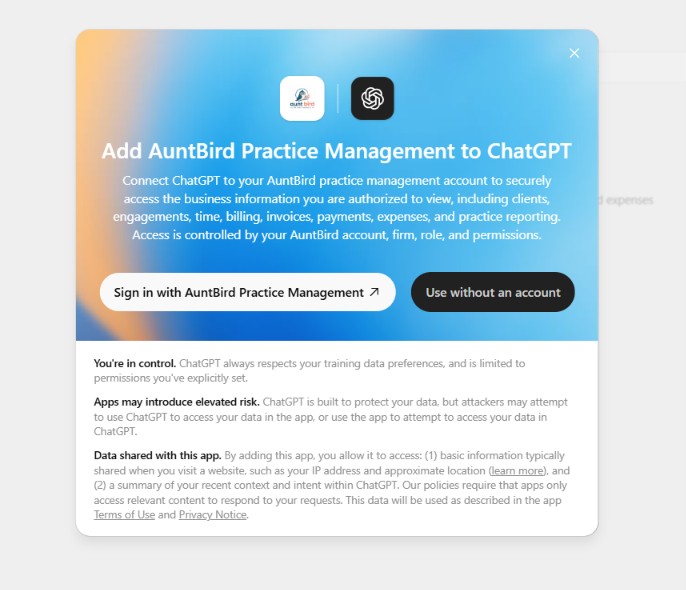
AuntBird Practice Management is available as a published ChatGPT plugin. Authorized firm users can connect their AuntBird account to ChatGPT and ask questions about the business information they are already permitted to view.
- Ask about clients, engagements, time, billing, invoices, payments, expenses, and practice reporting.
- Each user signs in with their own AuntBird firm account and completes AuntBird MFA when required.
- AuntBird firm, role, and user permissions continue to control what information the plugin can access.
- Firm administrators can control whether ChatGPT access is enabled for the firm and individual users.
Built around the way professional firms operate
From the first client conversation to the final payment.
AuntBird connects the operational pieces of your practice in one consistent system.
Clients and contacts
Keep client profiles, contacts, billing details, status, and related work organized and easy to find.
Engagement management
Define the work, billing method, rates, dates, assignments, status, and expectations for every engagement.
Time tracking and approvals
Capture time with timers or manual entries, route it for approval, and keep billable work accountable.
Recurring work
Manage recurring bookkeeping and flat-fee work without losing visibility into the time employees spend delivering it.
Employee goals
Set weekly, monthly, quarterly, and annual billable-hour goals and track employee progress and utilization.
Work in progress
See approved unbilled time and unbilled revenue so managers know what work is waiting to be billed.
Billing and invoices
Turn completed work into invoices, manage recurring schedules, and maintain a clear billing workflow.
Payments and receivables
Record customer payments, monitor balances, track advance payments, and follow aging and collections.
Client portal
Give clients secure access to invoices, payments, document requests, uploads, and files the firm shares with them.
Secure document workflows
Request files from clients, receive portal uploads, share documents back to clients, and keep files in the firm's connected Microsoft 365 SharePoint or Google Drive repository.
Revenue reporting
Review billed revenue, unbilled revenue, collections, outstanding balances, and client-level performance.
Practice analytics
Track utilization, profitability, work in progress, invoice activity, goals, and overall firm performance.
Firm administration
Manage users, roles, permissions, firm settings, workflow access, and the operational structure of your practice.
ChatGPT plugin integration
Connect authorized AuntBird users to ChatGPT so they can ask questions about permitted practice-management information while AuntBird roles and permissions remain in control.
One connected practice workspace
The details managers need without the spreadsheet chase.
From daily time entry to firm-level reporting, AuntBird keeps operational and financial information connected to the same clients and engagements.
Billable and unbillable time
See where employee time goes and how much of the work contributes to revenue.
Daily, weekly, and monthly visibility
Review employee time and productivity across the periods managers actually use.
Recurring-fee productivity
Record time against recurring flat-fee work even when it does not create an additional invoice charge.
Unbilled revenue
See work already performed that has not yet made it onto an invoice.
Collections and receivables
Monitor what has been billed, what has been collected, and what is still outstanding.
Client-level financial view
Bring invoices, payments, engagements, contacts, and work in progress together around the client.
Client document requests
Request specific documents, notify the client by email, and let the client upload the requested files through the secure portal.
Firm-controlled document storage
Connect Microsoft 365 SharePoint or Google Drive so client files remain in the firm's own cloud repository while AuntBird manages the workflow.
Role-based access
Give administrators, managers, and employees access appropriate to their responsibilities.
Invoice and payment history
Maintain a clear record of billing activity, allocations, balances, and client payments.
CSV-ready reporting
Export reporting data when the firm needs additional analysis or offline review.
ChatGPT access with AuntBird permissions
Authorized users can connect the published AuntBird Practice Management plugin to ChatGPT, with access limited by their AuntBird firm, role, and user permissions.
Designed for better firm operations
Spend less time chasing information.
Give partners and managers a clearer operating picture while making day-to-day work simpler for the team.
Reduce forgotten billable time by keeping approved unbilled work visible.
Move completed work into invoices with fewer handoffs.
Track recurring bookkeeping work without losing employee productivity data.
See employee goals, utilization, and billable progress in one place.
Monitor WIP, billed revenue, collections, and outstanding balances.
Request, receive, and share client documents without moving the firm's document repository into AuntBird.
Replace disconnected spreadsheets with one organized practice workspace.
Straightforward pricing
Everything your accounting firm needs. One plan.
No per-user pricing and no client limits as your practice grows.
Unlimited users
Unlimited clients
Client portal and secure document workflows included
Employee dashboards and reporting included
No feature tiers to unlock later
$149 / month
Start your AuntBird account
Frequently asked questions
AuntBird practice management software
Answers to common questions from accounting firms and professional service organizations.
What is AuntBird?
AuntBird is cloud-based accounting practice management software that connects clients, engagements, recurring work, time tracking, billing, invoices, payments, reporting, employee goals, and firm administration.
Who is AuntBird designed for?
AuntBird is designed for CPA firms, accounting firms, tax professionals, bookkeepers, and other professional service organizations.
How much does AuntBird cost?
AuntBird costs $149 per month and includes unlimited users and unlimited clients.
Does AuntBird include time tracking and billing?
Yes. AuntBird includes timers, manual time entries, approvals, billing workflows, invoices, recurring invoices, payment tracking, and reporting.
Can AuntBird manage recurring bookkeeping and flat-fee work?
Yes. Firms can manage recurring engagements and recurring billing while still recording time against the work for productivity and profitability visibility.
Can managers track employee goals and utilization?
Yes. Managers can track billable-hour goals, utilization, billable and unbillable time, and employee progress across weekly, monthly, quarterly, and annual periods.
Does AuntBird include work in progress reporting?
Yes. AuntBird can show approved unbilled work and unbilled revenue alongside billed revenue, collections, and outstanding balances.
Does AuntBird include a client portal?
Yes. Clients can securely access invoices and billing information, respond to document requests, upload requested files, and access documents the firm shares through the AuntBird client portal.
Where are client documents stored?
AuntBird can connect to the firm's Microsoft 365 SharePoint or Google Drive environment. The firm can request, receive, and share client documents through AuntBird while the actual files remain in the firm's connected cloud repository.
Can firms manage payments and advance payments?
Yes. Firms can record payments, track invoice allocations and unapplied amounts, and manage credits that can be applied to future invoices.
Is AuntBird cloud based?
Yes. AuntBird runs in a web browser, so authorized firm users can securely access their workspace online.
Does AuntBird integrate with ChatGPT?
Yes. AuntBird Practice Management is available as a published ChatGPT plugin. Authorized users connect with their own AuntBird account, and AuntBird firm, role, and user permissions determine what information ChatGPT can access.
Are there limits on users or clients?
No. The AuntBird plan includes unlimited users and unlimited clients.
Can managers approve time?
Yes. AuntBird supports time-entry review and approval so firms can control what work moves into billing and reporting.
Ready to organize your accounting firm?
Manage clients, engagements, recurring work, time, billing, secure document workflows, employee performance, WIP, payments, reporting, and authorized ChatGPT access from one secure practice management platform.
Start your AuntBird account